Your Appointment Reminder Does Not Need a Fucking Brain
Put rules on predictable work, AI on ambiguous inputs, and people on consequential decisions.
Your appointment reminder does not need a fucking brain. It needs the right time, the right channel, the right contact, and a stop condition. Adding an AI agent to that job can make a simple, testable process harder to trust.
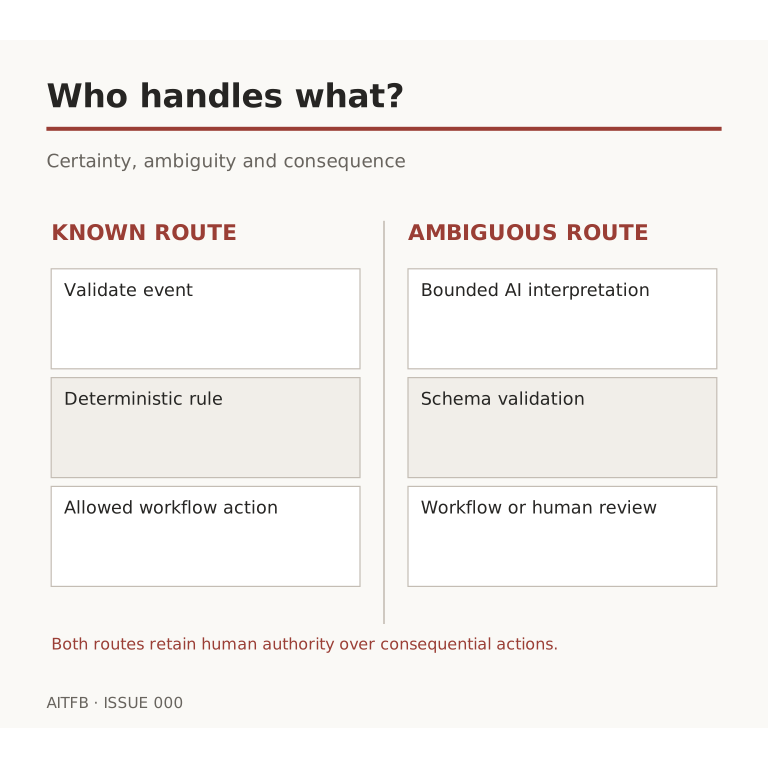
The rule for this edition is simple: software handles certainty, AI handles ambiguity, humans own consequence. Start by sorting the job before choosing the tool.
Automate the predictable part
A reminder has structured inputs: appointment date, local time, channel preference, contact record, and confirmation status. A deterministic workflow can check those fields, send the approved template, mark completion, and stop when the appointment changes or the contact opts out. It can log failure and retry once under a clear rule. No generative judgment is required.
The same applies to receipts, status changes, basic routing, record validation, and routine handoffs. If the condition can be written down and tested, use an ordinary rule. It is easier to audit, cheaper to run, and less likely to improvise.
Bring in AI where the input is messy
AI is useful when a customer message arrives in natural language and you need to classify intent, summarize a conversation, extract an order number, or draft a reply for review. The output should be structured and checked. A classification can feed a routing rule; it should not silently become permission to send a consequential message or change a sensitive record.
For example, an assistant can read “I need to move Thursday because my client pushed the meeting” and propose reschedule request with the original appointment ID. The scheduling workflow then verifies the ID, available slots, time zone, consent, and current status before acting. A human takes over if the request is unclear or a cancellation fee or dispute is involved.
Keep humans at the decision boundary
Payments, refunds, access changes, exceptions to policy, and messages with legal or reputational weight deserve an accountable person. AI can prepare the evidence and draft a recommendation. The authorized human approves the outcome. Approval is a defined workflow state, not an email someone hopes will be read.
A practical split for one workflow
- Trigger: a contact submits a request through the approved form.
- Rules: validate required fields, check consent and suppression, and detect duplicates.
- AI: classify the free-text request into a small, known set of categories and return the supporting evidence from the request. Allow an uncertain or unclassified result.
- Rules: route only routine categories that pass validated checks. Send uncertain, conflicting, or high-impact cases to a person.
- Human: approve the decision where consequence requires it.
- Rules: perform the approved action, record the result, and stop further processing.
Do not treat a model’s self-reported confidence as proof that it is correct. Test routing on representative examples, including ambiguous requests, and set acceptance thresholds from observed errors. If those checks are not in place, keep a human review step.
Test the unhappy paths before turning it on: missing data, conflicting status, duplicate trigger, opt-out, model failure, API timeout, and an approval that never arrives. A good automation knows how to stop.
Do not buy intelligence for a job that needs a checkbox. Save it for the moments where interpretation genuinely changes the outcome.